Controls · HUD · fight rules
First Person Boxing Controls and Fight Rules
First Person Boxing uses one mouse button per glove for straights, C and V for uppercuts, X for an overhand, F or Left Shift to guard, and Space plus WASD to slip. Body shots have no key: you aim the glove low. Press H in game for the controls panel and Left Alt to rebind keys.
First Person Boxing keybinds (keyboard and mouse)
This is the in-game Controls panel (H), Keyboard & Mouse tab, written out as a table. One row, hooks, was scrolled out of view in the footage we read, so we mark it unconfirmed rather than guess.
| Action | Input | Note |
|---|---|---|
| Punch | ||
| Straight | Left click / right click | One button per glove |
| Keep a straight out | Hold the click | Holds the arm extended |
| Left / right hook | Not yet confirmed | Row was scrolled out of view in our source |
| Left / right uppercut | C / V | |
| Overhand | X | Thrown with your selected glove |
| Swap glove | Mouse wheel | Changes which glove X uses |
| Defend | ||
| Guard (your style) | F / L-Shift | Shape depends on the style equipped |
| Head movement (slip, duck) | Space + WASD | |
| Body shots | Aim the glove low | No separate key |
| Move & view | ||
| Footwork | WASD | |
| Lock-on | Q | |
| Settings | L-Alt | Rebind any key in Settings › Keybinds |
| Gloves | G | |
| Shop / Customize | B / K | Codes are redeemed in the Shop |
| Fighting styles | Y | |
| Emotes | N, or 1–8 | Hold, aim at one, release; slots 1–5 |
| Controls panel | H | |
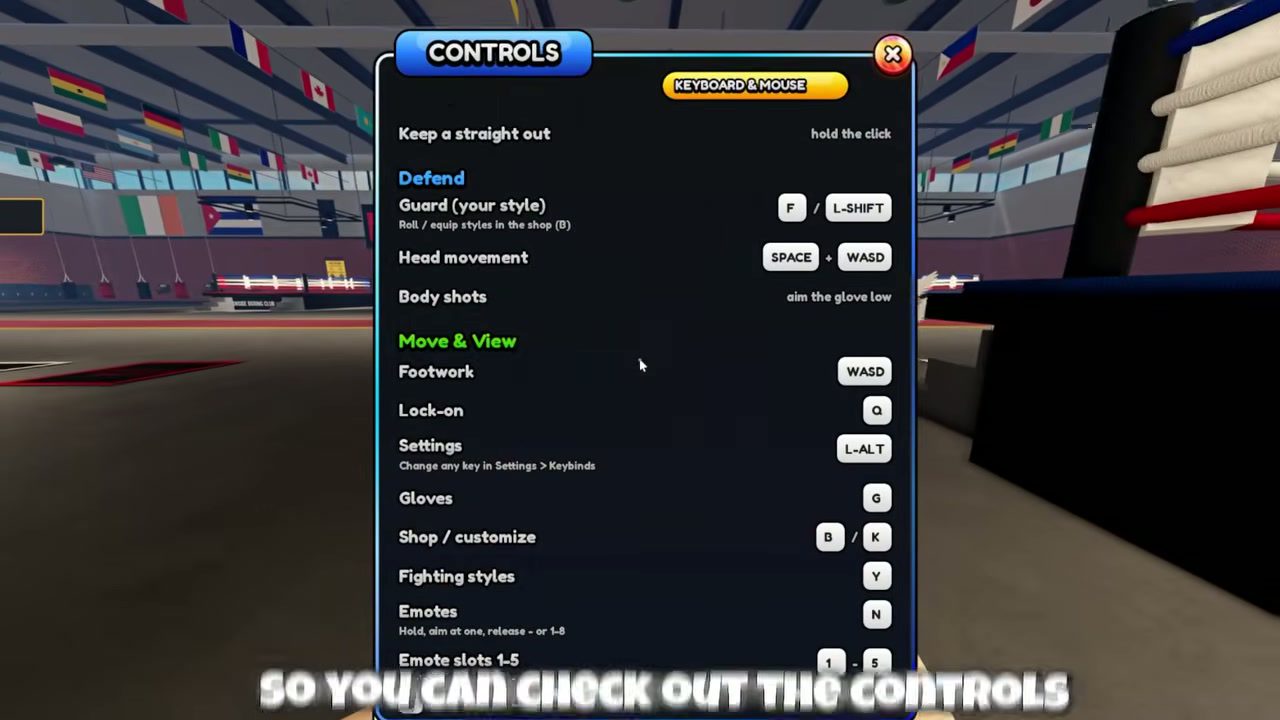
The game runs on PC, mobile and console. The panel is labelled Keyboard & Mouse at the top, and we have only seen the Keyboard & Mouse layout, so mobile and controller buttons are not listed here yet.
Three inputs new players miss
- Guard is your style. F does not raise one fixed block. It raises whatever guard your equipped style uses. The free High Guard keeps the gloves at the temples, while a shell style like Rope-a-Dope covers more and recovers stamina while blocking. See styles and drop rates.
- Overhand follows the selected glove. X throws with whichever glove the mouse wheel last picked. If your overhands keep coming from the wrong side, scroll once.
- Lock-on is optional. Q keeps the camera on your opponent. Settings has “Lock-on at fight start” and a lock-on speed slider. Turn it on if you lose your opponent after slipping.
How to read the fight HUD
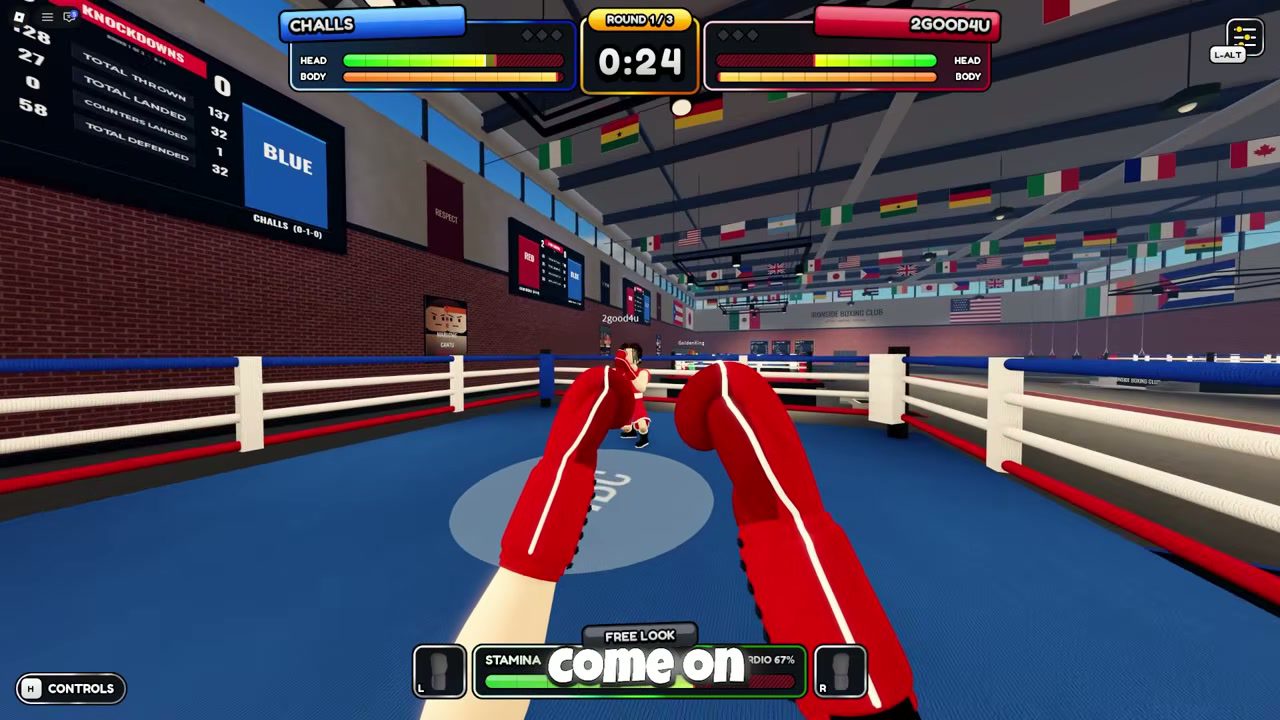
- HEAD and BODY bars. Each boxer has two health bars. Head shots drain the green HEAD bar and body shots the orange BODY bar. Pick the target by aiming high or low, and pick your guard by watching which bar the opponent is working on.
- Round timer. The centre box shows the round (for example Round 1/3) and the clock. Between rounds it reads BREAK.
- Stamina and Cardio %. The bar at the bottom is short-term stamina. The Cardio percentage next to it drops over a long fight. Callouts like “GASSED” and “INTERRUPTED” appear when you run dry or get hit mid-punch.
- Ring scoreboard. The board above each ring tracks Knockdowns, Total thrown, Total landed, Counters landed and Total defended for the current fight. It is a good way to check whether your defence is actually working.
“Slip punches, counter & outsmart your opponent”
How counters work
Counters are the main way to win trades. When you slip (Space + a direction) or duck under a punch, a COUNTER NOW prompt flashes. Punch while it is up and the hit is scored as a counter, shown as “SLIP COUNTER!” or “DUCK COUNTER!”. Blocked punches show “BLOCKED”, and “PARRIED” also appears in the same spot. The exact timing window for a counter is not published.
A simple pattern to practise against the AI: hold guard, wait for a straight, slip to the side, then answer with the opposite straight or an uppercut (C/V) while the prompt is up. Leading with overhands burns stamina and leaves you open when you miss.
Fight rules: what each option does
Step onto a ring pad to queue. When an opponent joins, a Fight Rules screen opens with a countdown, about 28 seconds in our source. Rules are shared: either boxer can change them, and the fight starts when both press Ready. Step off the pad to leave the queue.
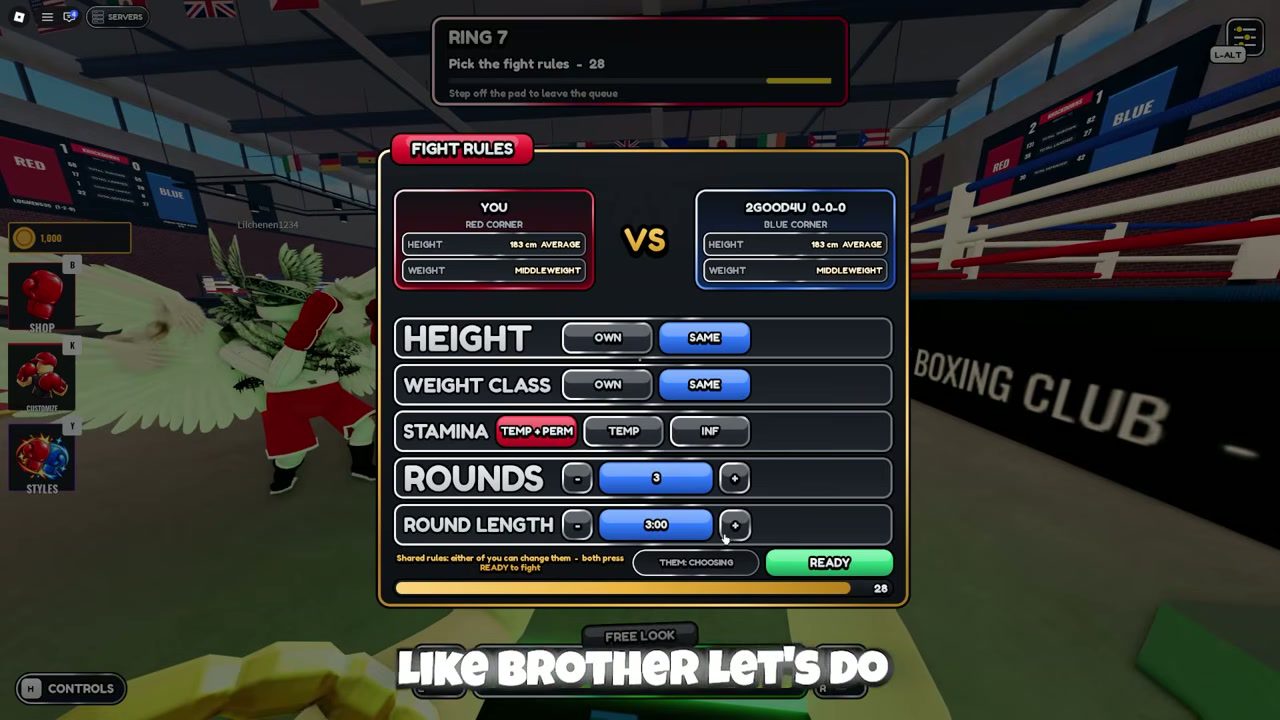
| Rule | Options | When to pick what |
|---|---|---|
| Height | Own · Same | Same removes any reach gap. Pick Own only if your custom height is an advantage. |
| Weight class | Own · Same | Same puts both boxers in one class. The card at the top shows each fighter’s class, for example Middleweight. |
| Stamina | Temp + Perm · Temp · Inf | Inf is best for practising combos. Temp + Perm (selected by default in our source) keeps the full tiredness system and rewards pacing. |
| Rounds | − 3 + | 3 is the default. Fewer rounds suit quick lobby fights. |
| Round length | − 3:00 + | Shorter rounds give stamina less time to matter. |
Height and weight come from your fighter in Customize (K), which has Body, Face and Height tabs. Rerolling height there costs 750 coins, the same as one style spin, so spend coins on styles first unless reach really matters to you.
Getting up after a knockdown
When you go down, the camera drops to the canvas and a GET UP panel appears with the referee’s count. You climb through four stages, Down → Hands & knee → One knee → Pushing up, by keeping a moving marker inside the gold zone. Stay calm and track the marker instead of mashing. Every knockdown is added to the Knockdowns line on the ring scoreboard. Turn off Knockdown replays in Settings if you would rather skip the cinematic replay.
Settings worth changing first
- Field of view: our source started at 80 and raised it to 100. A wider view helps you see hooks coming from the side, at the cost of making the opponent look smaller.
- Glove and Look sensitivity: separate sliders for how far the gloves move and how fast the camera turns. Lower the glove value if your body shots keep drifting up into the guard.
- Head moves with punches: an on/off toggle. Turning it off should keep the camera steadier when you throw.
- Graphics: Auto, Low or High. Try Low on a slower phone if your inputs feel late.
- Control hints and Tutorial: the tutorial can be restarted from Settings at any time.
Controls FAQ
What are the controls for First Person Boxing on PC?
Left and right click throw straights (hold to keep one out), C and V throw uppercuts, X throws an overhand with the selected glove, F or Left Shift raises your guard, Space plus WASD moves your head, WASD is footwork and Q locks on. Press H in game to see the full panel.
How do you throw a body shot in First Person Boxing?
There is no body-shot key. The controls panel says "aim the glove low": look down at the opponent's torso while you punch. Body hits drain the orange BODY bar under the opponent's name instead of the HEAD bar.
How do you counter in First Person Boxing?
Slip or duck an incoming punch with Space plus a direction, then punch while the "COUNTER NOW" prompt is up. A good counter shows "SLIP COUNTER!" or "DUCK COUNTER!". Counters landed are tracked on the ring scoreboard.
How do you get up after a knockdown?
A GET UP panel appears with a count and four stages: Down, Hands & knee, One knee, Pushing up. Keep the moving marker inside the gold zone to progress through the stages before the count runs out.
Can you change the keybinds?
Yes. Open Settings with Left Alt, switch to the Keybinds tab and rebind any action. The General tab also has glove and look sensitivity, field of view, lock-on options and a knockdown replay toggle.
What does infinite stamina do in fight rules?
The Stamina rule has three options: Temp + Perm, Temp, and Inf. Inf removes tiredness from the fight. The other two names suggest Temp is stamina that refills between exchanges and Perm is a longer drain, shown as the Cardio % on the HUD; the game does not explain them further. Both fighters see the same rules screen and both must press Ready.
Want a different guard? Check the style drop rates and redeem the free spin codes first.
Last verified: 2026-10-17 · Game version: Ranked + Bug Fix (Oct 17, 2026) · Sources: CHALLS gameplay (Controls, Fight Rules, Settings), Roblox experience page